Prompts in Galileo allow you to create, store, and reuse LLM prompts across your experiments. They provide a structured way to manage your LLM interactions.

Prompts in the Galileo console
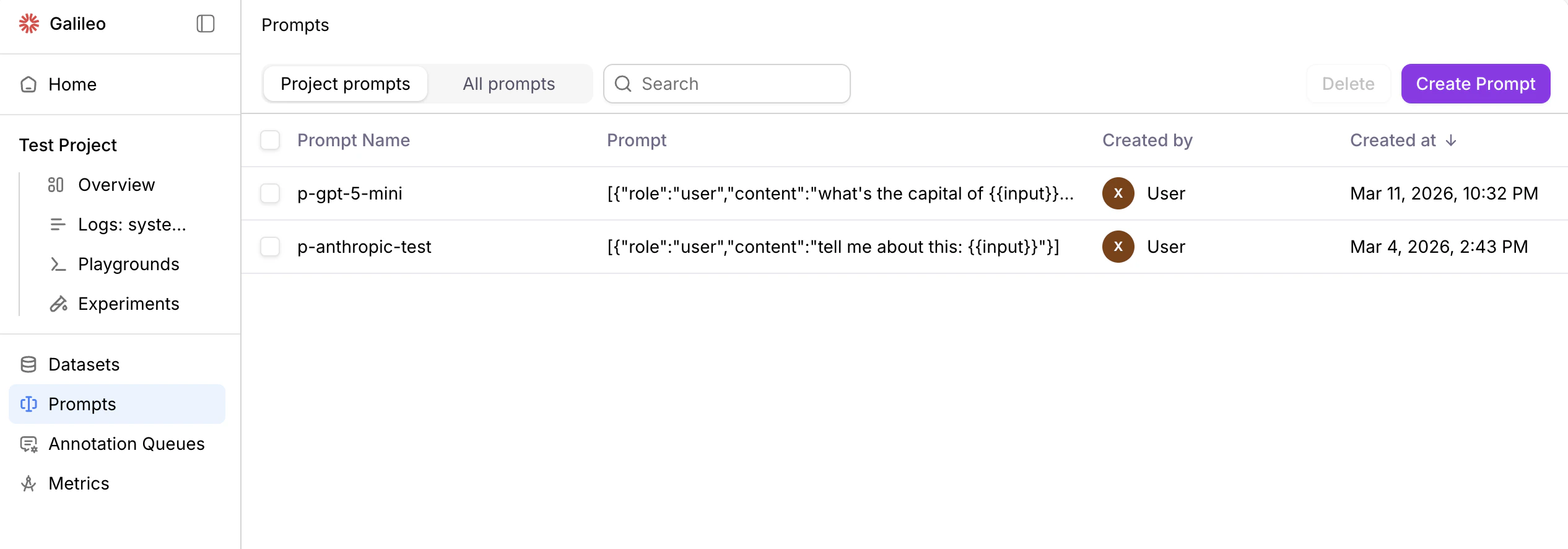
Prompts in the Galileo console The Prompts page of the Galileo console shows you the existing prompts associated with your selected project. Click on All prompts to view all prompts in your organization. Click the Create Prompt button to create a new prompt.

Prompts in code

Create prompts

from galileo import Message, MessageRole
from galileo.prompts import create_prompt

# Create a prompt with system and user messages
prompt = create_prompt(
    name="storyteller-prompt",
    template=[
        Message(role=MessageRole.system,
                content="You are a great storyteller."),
        Message(role=MessageRole.user,
                content="""
                Please write a short story about
                the following topic: {{topic}}
                """)
    ]
)

Connect prompt templates to dataset inputs

When you use datasets in Galileo, the attributes stored in the input in your dataset are made available to your prompt templates using mustache templating. This allows you to create dynamic prompts that adapt to the data in each row. Suppose you have the following dataset:
test_data = [
    { "input": { "city": "Rome, Italy", "days": "5" } },
    { "input": { "city": "Paris, France", "days": "3" } },
]
To reference fields from your dataset in your prompt, use double curly braces:
Message(role=MessageRole.user,
        content="""
        Plan a {{ days }}-day travel itinerary
        for a trip to {{ city }}.
        """)
  • {{ city }} will be replaced with the value of the city field inside the input dictionary.
  • {{ days }} will be replaced with the value of the days field inside the input dictionary.

Get prompts

Once prompts have been created in Galileo, they can be retrieved by name. For project level prompts, pass in either the project name or Id.
from galileo.prompts import get_prompt

# Get an existing prompt
prompt = get_prompt(
    name="storyteller-prompt"
)

List prompts

To list all prompt templates in a project or organization:
from galileo.prompts import get_prompts

# List all prompt templates in a project
templates = get_prompts()

# Print template names
for template in templates:
    print(f"Template: {template.name}")

Delete prompts

To delete a prompt:
from galileo.prompts import delete_prompt

# Delete a prompt
delete_prompt(
    name="storyteller-prompt"
)

Use prompts in experiments

Prompts can be used in experiments to evaluate different prompt templates:
from galileo.datasets import get_dataset
from galileo.experiments import run_experiment
from galileo.prompts import get_prompt
from galileo import GalileoMetrics

# Get an existing dataset
dataset = get_dataset(
    name="countries"
)

# Get an existing prompt
prompt = get_prompt(
    name="geography-prompt"
)

# Run an experiment with the dataset and prompt
results = run_experiment(
    "geography-experiment",
    dataset=dataset,
    prompt_template=prompt,
    metrics=[GalileoMetrics.completeness],
    project="my-project",
)

Best practices

When working with prompts:
  1. Use descriptive names that reflect the prompt’s purpose
  2. Include clear system messages to set context
  3. Document any required input variables
  4. Version your prompt templates appropriately
  5. Test prompt templates with various inputs before using in production

Datasets

Learn about more datasets, the data driving your experiments.

Experiments

Learn how to use datasets and experiments to improve your application.